Discussion: View Thread

  • 1.  Creating a Graphical Display with x-axis "broken"

    Posted 06-03-2022 19:51
    Dear Colleagues,

    I am seeking assistance with producing a graphical display of data using a range plot superimposed on a scatter plot.
    I need to represent data with range for the y axis broken (or discontinued) so that all maximum values for ranges displayed on the plot can be clearly shown. One range has an extremely high maximim value, compared to the other ranges. 
    Please send me a message if you will be able  to assist or give advice.
    My software of choice is Stata software but will resort to other software if necessary.

    Regards

    Novie

    ------------------------------
    Novie Younger-Coleman
    Statistician
    Caribbean Institute for Health Research, UWI, Mona, Jamaica
    ------------------------------


  • 2.  RE: Creating a Graphical Display with x-axis "broken"

    Posted 06-04-2022 11:17
    I urge you to read about broken axes on pages 104 to 109 of The Elements of Graphing Data by William Cleveland published in 1994 by Hobart Press.  Taking logs can avoid the need to break the axis if your audience understands logs.

    Naomi B.Robbins
    Author of Creating More Effective Graphs


    ------------------------------
    Naomi Robbins
    ------------------------------


  • 3.  RE: Creating a Graphical Display with x-axis "broken"

    Posted 06-05-2022 13:49
    I agree with Dr. Robbins about avoiding broken axes, and reading the advice of Cleveland.

    Further, given that most people do not understand logs well (and log graphs have their own drawbacks even among people who do understand them), one might also reconsider whether making a graph at all is really the best way here to increase the audience's understanding of the topic.  Perhaps a table and/or text would be better, at least for the ranges.

    ------------------------------
    Michael Hanna, PhD
    ------------------------------


  • 4.  RE: Creating a Graphical Display with x-axis "broken"

    Posted 06-06-2022 00:45
    On the other hand, if Break The Axis, We Must, then the Xaxis statement in SAS's SGPlot procedure has a Ranges option that allows one to do just that. 
    http://documentation.sas.com/doc/en/pgmsascdc/9.4_3.4/grstatproc/p07m2vpyq75fgan14m6g5pphnwlr.htm

    ------------------------------
    Eric Siegel, MS
    Biostatistics Project Manager
    Department of Biostatistics
    Univ. Arkansas Medical Sciences
    ------------------------------


  • 5.  RE: Creating a Graphical Display with x-axis "broken"

    Posted 06-06-2022 01:11
    It appears that, although Stata's graphics commands do not allow for broken axes, they do allow one to cheat. 
    https://www.stata.com/support/faqs/graphics/scale-breaks/

    ------------------------------
    Eric Siegel, MS
    Biostatistics Project Manager
    Department of Biostatistics
    Univ. Arkansas Medical Sciences
    ------------------------------


  • 6.  RE: Creating a Graphical Display with x-axis "broken"

    Posted 06-06-2022 15:17
    One possible solution - Virtually all graphics programs can plot 2 y-axes on the same graph, apparently including Stata. While that is not exactly what you are asking for, it does compare the data on two different scales in a way the reader will understand.  I use R and Excel and both do that very well. A link I found for doing this with Stata is:

    https://www.statalist.org/forums/forum/general-stata-discussion/general/1459606-two-y-axes-plot

    ------------------------------
    Russ Conte
    ------------------------------


  • 7.  RE: Creating a Graphical Display with x-axis "broken"

    Posted 06-07-2022 11:09
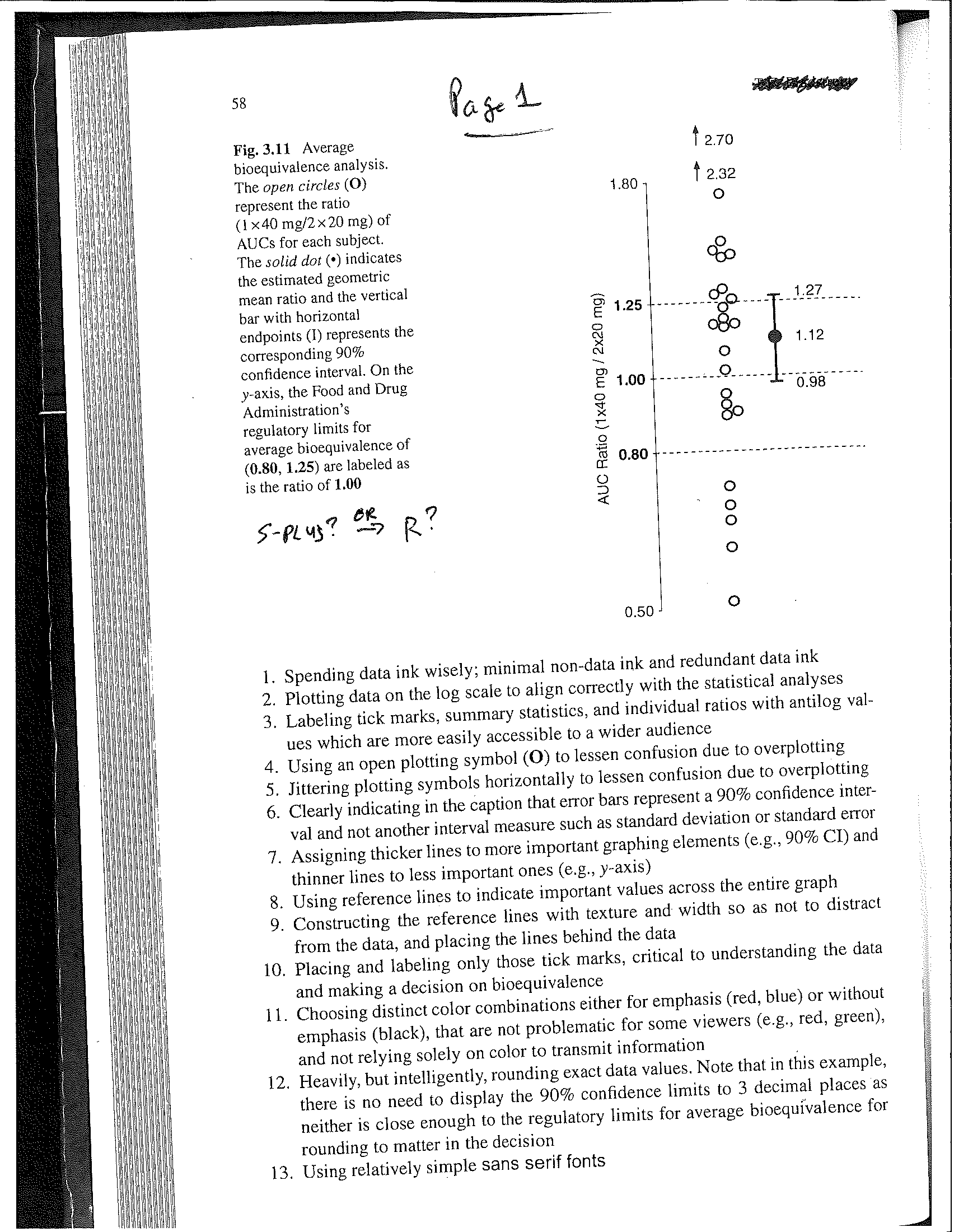
    Depending upon your specific situation, and what you want the graph to communicate, another candidate strategy might be to focus on the maverick point(s) allowing the axes to remain in tact for the majority of the points. Please see the two examples below. This idea originally suggested to me (personal communication) by John Tukey (JWT).

    Example 1 (Pages 1 and 2):  Univariate.  The "up arrows" indicate that there are some "way out" / "far out" values of sizes 2.32 and 2.70, while allowing all the other points to be clearly visible. Constructed in either S-PLUS or R, I believe.

    Example 2 (Page 3): Same idea extended to 2 dimensions. The "up arrow" and "down arrow" indicate points far away from the others, but still allows clarity of the scatter plot. The arrows are placed at the x-value for each point. This plot hand drawn by JWT (?) in his EDA Book.

    To reference the original idea:  Tukey, JW (1977). Exploratory Data Analysis, Reading, MA: Addison-Wesley Publishing Company.

    Example 2 is from page 187 in his book, but JWT provides additional guidance on other uses of the arrows, as well as other simple glyphs or notations to communicate quantitative / qualitative information effectively and efficiently. 


    ------------------------------
    Thomas Bradstreet
    Director, Preclinical Imaging, Biomarkers, and Discovery Biostatistics
    Bristol-Myers Squibb
    ------------------------------


  • 8.  RE: Creating a Graphical Display with x-axis "broken"

    Posted 06-07-2022 15:54
    I have used a log scale when I plot the points but then label the axes with the original scale. Here's an example in Figure 4B: Evaluation of a Smartphone Decision-Support Tool for Diarrheal Disease Management in a Resource-Limited Setting

    Would something like that help with you extreme values?

    Robyn


    ------------------------------
    Robyn Ball
    Computational Scientist
    ------------------------------


  • 9.  RE: Creating a Graphical Display with x-axis "broken"

    Posted 06-07-2022 16:50
    Thanks, Robyn.
    This is another novel approach to handling and displaying extreme values on axes that I would have never thought of.  All the responses I have received are also helping me pull together content for  an upcoming teaching session entitled "Data Presentation and interpretation".

     I am just now wondering about the pros and cons of the representation of extreme values as though they were not extreme when we label them on the original scale or "narrow" the gaps in axes and label points with extreme values.

    Another colleague from this group helped me identify the source of the problem that I had - my confidence interval upper limit had an extreme value because the sample size used to produce this interval was small in size relative to the size of the other groups.  I will now revisit the analyses bearing that in mind,  while I now utilise what I have learned for this discussion to address the display of extreme values as the need arises. 

    Thanks, again, to you and the group for al the contributions to the discussion.

    Regards

    Novie 


    ------------------------------
    Novie Younger-Coleman
    Statistician
    Caribbean Institute for Health Research, UWI, Mona, Jamaica
    ------------------------------